Smart Kitchen Nutrition Scales: The 2026 Buyer's Guide
Smart nutrition scales turn weighing into real calorie and macro numbers, but only if the app and database hold up. Here is how to judge one before you buy.
By 2k50 Tech Team
Smart Kitchen Nutrition Scales: The 2026 Buyer's Guide
You already know the frustrating part of tracking what you eat. It is not the willpower. It is the guessing: a "medium chicken breast," a "handful of almonds," a "bowl of rice." Every one of those phrases hides a range of 100 calories or more, and over a week of guessing, the error quietly swallows the whole point of tracking.
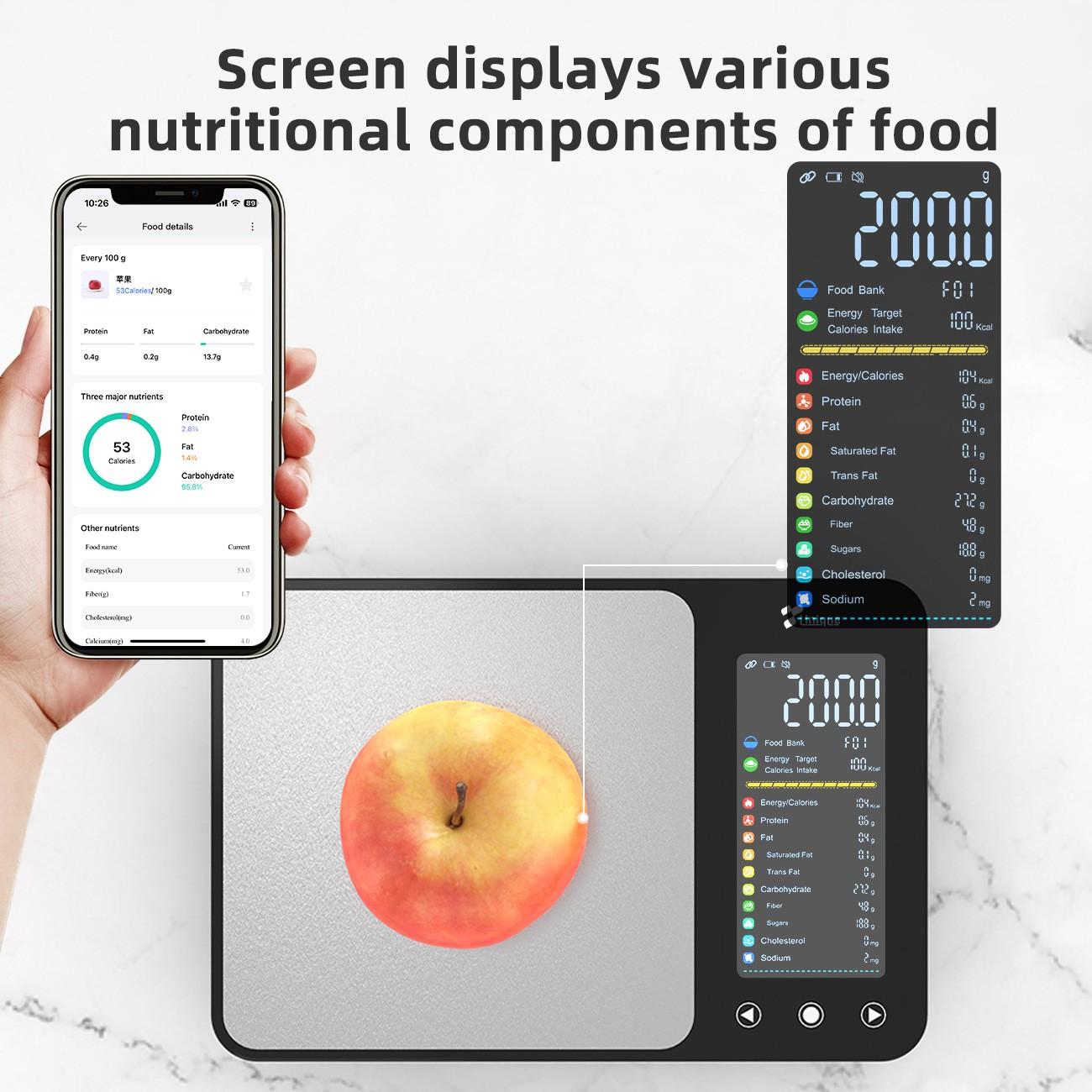
A smart kitchen nutrition scale attacks exactly that problem. It weighs your food to the gram, sends the weight to an app on your phone, and turns it into calories, protein, carbs, and fat for the exact portion in front of you. No cups, no eyeballing, no second app for the maths. This guide explains how these scales actually work, where their numbers come from, the seven decisions that matter before you buy, what the price tiers really get you, and who should skip the category entirely.
How a Smart Nutrition Scale Actually Works
Underneath, a smart scale is an ordinary digital kitchen scale with one addition: a Bluetooth radio. Load cells under the platform convert the weight pressing down on them into an electrical signal, and the scale's processor turns that signal into a number in grams or ounces. That part is mature technology, and it is why most decent scales, smart or not, agree with each other within a gram or two on everyday portions.
The "smart" part happens after the weighing, and it is almost entirely software:
1. You place food on the scale, and it weighs it like any digital scale. 2. The scale sends that weight to an app on your phone over Bluetooth, usually connecting automatically when the app is open. 3. You tell the app what the food is — by searching, scanning a barcode, or picking from recent foods. 4. The app looks the food up in its nutrition database and multiplies the per-100-gram values by your actual weight, showing calories and nutrients for exactly that portion.
That sequence contains the category's most important truth, and the one most listings hide: the scale knows the weight, but it does not know what the food is. It cannot tell chicken from cheese. Every calorie number it shows is a calculation built on two inputs — a measured weight and a database entry you selected — and the second input is where most of the error lives. A perfect scale paired with the wrong database entry still gives you a wrong answer, confidently.
A second consequence follows: when you compare smart scales, you are mostly comparing apps and databases, not weighing hardware. Two scales with identical load cells can feel like completely different products if one app has a deep, well-curated food database with barcode scanning and the other makes you type every food by hand.
The Accuracy Question, Honestly Answered
Let us put numbers on the two kinds of accuracy, because listings blur them together.
Weighing accuracy is the easy part. Most smart kitchen scales claim 1-gram resolution, and on portions above about 50 grams they are typically within a gram or two of the true weight. That is more than good enough for calorie counting: a 2-gram error on 200 grams of cooked rice changes the calorie count by roughly 3 calories. Where small errors do matter is with calorie-dense foods in tiny amounts — 5 grams of oil, 10 grams of peanut butter, a pinch of nuts. There, a 1-gram error is 10 to 20 percent of the portion, which is why serious trackers weigh oils and spreads rather than pouring them freehand, and why a scale that is honest at 500 grams but drifts at 20 grams is a worse tracker than its headline spec suggests.
Nutrition accuracy is the harder part, and no scale can fix it alone. Database entries for the same food vary: one brand's wholemeal bread is not another's, restaurant dishes are estimates, and cooked-versus-raw weights change everything — 100 grams of raw chicken breast and 100 grams of cooked chicken breast are different foods nutritionally, because cooking drives off water. The practical fix is boring but effective: log the state you actually weighed (raw or cooked), use entries that match your specific brand when they exist, and treat the app's number as a good estimate, not a laboratory measurement. Anyone promising laboratory precision from a kitchen gadget is selling you something else.
A quick home test tells you more than any spec sheet. Weigh a sealed 500-gram bag of sugar or flour — the printed weight is a known reference — and then weigh a single coin or a small known weight at the low end. If the scale reads the big weight correctly but wobbles or rounds oddly at the low end, you have learned its real behaviour in thirty seconds.
The 7 Decisions That Matter
1. The app and its database come first
Before you look at any other spec, open the companion app's listing and ask four questions. How large and well-curated is the food database — does it cover brands and packaged foods in your country, or only generic items? Does it scan barcodes, so a packaged food logs in seconds rather than after a manual search? Does it track more than calories — protein, carbs, fat, fibre, sugar, sodium at minimum? And does it require a subscription for the features that matter, or are they free? A scale whose best features sit behind a monthly fee costs far more over two years than its sticker price suggests, and several budget scales in this category are cheap precisely because the app monetises later. Check this before buying, not after unboxing.
2. Resolution and capacity: the two numbers that actually matter
Resolution is the smallest step the scale displays — usually 1 gram. Capacity is the maximum it weighs — usually 5 to 10 kilograms. For nutrition tracking, 1-gram resolution is sufficient for almost everyone; 0.1-gram resolution matters mainly for coffee brewing or jewellery, not for dinner. Capacity matters more than people expect: a scale capped at 3 kilograms will struggle with a mixing bowl full of dough or a whole chicken, and weighing in a heavy bowl eats into the range. A 5-kilogram minimum is a sensible floor, and 10 kilograms is comfortable for family cooking. Also check the minimum weight: some scales ignore anything under 2 to 5 grams, which makes weighing a pinch of salt or a few grams of spice an exercise in frustration.
3. Tare, and how fast the reading settles
Tare — zeroing the scale with a bowl on it — is the feature you will use every single day, and it should be instant and obvious. Put the bowl on, tap tare, add the ingredient, read, tap tare again, add the next. A scale that takes two seconds to settle after every addition turns a five-ingredient recipe into a slow, irritating ritual. Responsiveness is hard to judge from a listing, so look for owner reports about lag and drift: does the reading creep upward while food sits on the platform, or does it hold steady? A stable reading that settles in under a second is the everyday luxury in this category.
4. Platform size and cleanability
A small platform looks neat in photos and fails in real kitchens. A dinner plate, a mixing bowl, or a chopping board needs room, and food that overhangs the platform can press on the surrounding surface and distort the reading. Look for a platform wide enough for your largest bowl, and a flat surface that wipes clean — spills are inevitable, and a scale with seams and crevices around the display becomes a hygiene project. Stainless steel or tempered glass tops wipe down in seconds; textured plastic traps crumbs. If the scale will live on the counter, also consider whether its display stays readable when a large bowl covers the platform — some designs move the display forward or angle it for exactly this reason.
5. Bluetooth reliability and offline behaviour
The Bluetooth link is the smart scale's weakest joint. Phones drop connections, apps crash mid-recipe, and kitchens are full of wireless interference. Ask what happens when the link fails: does the scale still work as a plain digital scale, showing the weight on its own display? It should — a scale that is useless without its app is a liability, not a feature. Also ask whether the app needs an internet connection for database lookups. Most do, which means a scale that works perfectly at home may be far less useful in a cabin, a dorm, or anywhere with weak signal. If you track food while travelling, an app with offline favourites and recently used foods matters more than any other feature.
6. Power: batteries versus rechargeable
Most smart kitchen scales run on AAA batteries or a built-in rechargeable cell charged over USB. Batteries are boring and dependable: they last months, and a dead scale is fixed in a minute at any shop. Rechargeable scales are tidier and cheaper over years, but they add a charging ritual and a battery that will eventually degrade. Neither is wrong. The mistake is buying a rechargeable scale and discovering it dies mid-prep with no way to swap in fresh cells, or buying a battery scale and discovering it uses an uncommon cell size. Check the power source before you buy, and keep spare batteries or a charged cable where you actually cook.
7. Data ownership and where your food log goes
A nutrition app holds a diary of what you eat, when, and how much — genuinely personal data. Before committing months of logs to one app, check whether you can export your history, whether it syncs with Apple Health or Google Fit, and what happens to your data if you switch scales. A scale whose app locks your history inside a single ecosystem is a worse long-term buy than a slightly less accurate scale with open export, because the cost of switching grows with every meal you log. This is also the right moment to check privacy basics: does the app require an account, what does it collect beyond your food log, and can you delete your data? A reputable app answers all three plainly.
What the Price Tiers Really Get You
Budget scales, roughly $15 to $30, usually weigh accurately enough and pair with a basic app. What you give up is database depth, barcode scanning speed, and polish: searches return fewer brand-name matches, logging takes more taps, and the app may push a subscription for full nutrient breakdowns. For someone who eats mostly whole foods and cooks from scratch, a budget scale is often entirely sufficient — generic entries for rice, chicken, and vegetables are well covered everywhere.
Mid-range scales, roughly $30 to $60, are where the category's sweet spot sits for most buyers. This is where you typically find larger, better-curated databases, reliable barcode scanning, macro and micronutrient tracking, recipe scaling (weigh an ingredient, and the app scales the whole recipe's nutrition), and a sturdier platform. The [Smart Kitchen Nutrition Scale](https://www.2k50.store/product/cj-prod-2096861876128079873) at $40.70 sits in this band: a mid-range price for the full tracking workflow rather than just a weighing function. At this tier, judge the app, not the hardware — two scales at the same price can differ far more in software than in steel.
Premium scales, $60 and above, add features that matter to fewer people: AI food recognition from a camera, automatic meal detection, integration with coaching platforms, or laboratory-grade resolution. Camera recognition sounds magical and, in practice, still struggles with mixed dishes, sauces, and anything that is not a single recognisable item on a plate. It is improving, but in 2026 it remains a convenience for simple meals rather than a replacement for telling the app what you are eating. Pay for premium only if you have a specific need it serves — competitive athletes tracking to the gram, or a household that genuinely logs every meal and wants the fastest possible workflow.
Who Should Skip a Smart Scale
A smart scale is not for everyone, and honest guides say so. Skip it if you already track successfully with a regular scale and a nutrition app — you already have the workflow, and the Bluetooth link adds a failure point without adding accuracy. Skip it if you mostly eat out or eat pre-packaged meals with printed nutrition labels, where the weighing step adds little. Skip it if you find tracking itself stressful or obsessive: a more precise tool does not make a healthier relationship with food, and for some people the daily numbers do more harm than good — a regular scale, or no scale at all, is the kinder choice. And skip the premium tier unless you will actually use the advanced features daily; an expensive scale used twice a month is a worse buy than a cheap one used every day.
The First-Week Checklist
If you do buy one, the first week decides whether it becomes a habit or a drawer ornament. Start by testing accuracy with a known weight, as described above. Then log three ordinary meals end to end, and time how long each takes — if logging a meal takes more than a minute or two, something in the app workflow is wrong for you, and it is better to discover that in week one than in month three. Build a favourites list of the ten foods you eat most often; that single habit cuts daily logging time more than any other feature. Learn the cooked-versus-raw distinction for the proteins you eat most, and pick one convention and stick to it. Finally, decide where the scale lives: on the counter, where you will reach for it, not in a cupboard, where you will forget it. A scale that is put away is a scale that is not used.
The Bottom Line
A smart kitchen nutrition scale does one thing well: it replaces guessing with measuring, and then it does the arithmetic for you. Its value lives almost entirely in its app and database, not in its weighing hardware, which is why the right buying question is never "how accurate is this scale" but "how fast and how reliably does this app turn a weight into a trustworthy nutrition number for the foods I actually eat." Answer that question with the seven decisions above, buy the cheapest scale whose app passes your test, and keep your expectations honest: the number it shows is a good estimate built on a real weight, and that is exactly what makes it more useful than any guess. For most home cooks and trackers, that is enough — and it is the difference between a tool that earns its counter space and one that ends up in the drawer.